
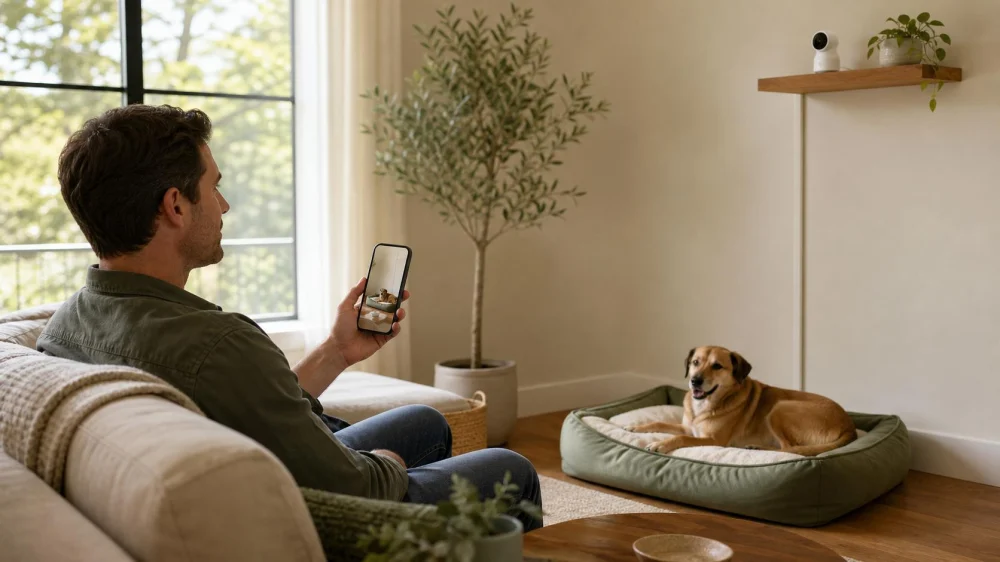
Pet Camera Setup: View, Privacy, Cords, and Alerts
On this page
- Quick answer
- Choose one monitoring purpose
- Frame a useful, respectful view
- Secure the camera and power cord
- Protect the account and network
- Set household privacy boundaries
- Tune motion, sound, and activity alerts
- Watch how the pet responds
- Know what a camera cannot tell you
- Pet-camera setup checklist
- Frequently asked questions
- Sources and evidence notes
- Conclusion and next steps
Quick answer
Place a pet camera on stable furniture or an approved mount where it captures the pet’s main area without showing bedrooms, screens, mail, security codes, or neighboring property. Route the cord inside a pet-resistant cover and outside chewing, pulling, water, and walking zones. Change default credentials, use a unique password and two-factor authentication, update device and app software, limit shared access, and test alerts while home. A camera supplements—not replaces—pet care, emergency contacts, and veterinary evaluation.
This US guide applies to ordinary indoor pet monitoring. Camera, audio-recording, rental, workplace, household, and guest-notice rules vary. Check applicable law, building agreements, and manufacturer instructions, and obtain consent from people who may be recorded.

Choose one monitoring purpose
Decide what question the camera should answer. You might want to confirm that a dog settles after departure, watch a cat’s feeding station, check whether multiple pets share a room safely, or let a sitter verify arrival. A clear purpose determines the field of view, alert type, recording schedule, and retention.
A camera placed “to see everything” captures more private activity, creates more false alerts, and can still miss the pet. Start with one high-use zone and the shortest recording or retention setting that meets the need.
Write a response plan for each useful observation: call the sitter, return home, contact a neighbor, or seek veterinary advice. Monitoring without a response path can create anxiety without improving care.

Banfield Pet Hospital
Los AngelesLos Angeles CountyCalifornia
4550 W Pico Blvd Suite D304, Los Angeles, CA 90019, USA
Frame a useful, respectful view
Place the device while the pet is awake and supervised. Use the live preview to include the bed, crate exterior, play area, food or water station, and main entrance to the room as relevant. Check daylight, evening light, and night mode.
Avoid views of:
- bedrooms, bathrooms, or changing areas;
- computer monitors, televisions, mail, calendars, and medicine labels;
- alarm panels, door codes, keys, financial records, or work documents;
- children’s private spaces;
- neighboring windows, yards, or shared hallways; and
- a sitter’s or guest’s expected private area.
Pan-and-tilt cameras can move beyond the original frame. Set movement limits or privacy zones when available and test every preset.
Secure the camera and power cord
Use a manufacturer-approved shelf, base, or mount on a surface that cannot tip when the pet jumps, rubs, or pulls. Keep the camera outside the crate and away from beds, curtains, shelves used for climbing, water bowls, litter scatter, and direct heat.
Route the entire cable behind furniture or inside a cord cover rated for the location. Leave no dangling loop that can be chewed, caught on a collar, or pulled across the floor. Protect the plug and adapter while allowing required ventilation.
Battery cameras remove a power cord but still require safe charging, secure battery access, and a plan for low power. Stop using a hot, swollen, cracked, wet, or damaged device and follow the manufacturer’s support and disposal instructions.
Protect the account and network
- Buy a device with supported software, encryption information, and clear update and privacy controls.
- Change default usernames and passwords during setup.
- Use a long, unique account password not used elsewhere.
- Turn on two-factor authentication when available.
- Update the camera firmware, mobile app, phone, and home router.
- Use an encrypted home Wi-Fi network with a strong router password.
- Disable remote viewing, microphone, speaker, cloud storage, or sharing features you do not need.
- Review connected users, access logs, and shared links periodically.
Do not post a live link publicly. Give a sitter the lowest access level and shortest time window that works, then remove access when the job ends.
Set household privacy boundaries
Tell household members, visitors, cleaners, walkers, and sitters where the camera is, what it captures, whether audio or video is recorded, who can watch, and how long recordings remain. A visible camera is not a substitute for legally required notice or consent.
Create a physical or app-based privacy mode for times when monitoring is unnecessary. Confirm that a status light, shutter, or schedule actually stops the intended video, audio, and cloud recording. Do not rely on an unfamiliar icon.
Delete test clips and old recordings according to the chosen retention plan. Before selling, donating, or discarding the camera, remove shared users, download needed records, sign out, unlink the account, and complete the manufacturer’s secure reset process.
Tune motion, sound, and activity alerts
Start with alerts off while confirming the camera view. Then enable one alert type at a time and test it during normal pet activity. Use activity zones to exclude curtains, a television, moving tree shadows, busy windows, or a ceiling fan.
Set a threshold that supports action. A notification for every tail movement becomes noise; an alert only after prolonged sound or entry into a restricted zone may be more useful. Device “bark,” “meow,” “person,” or “pet” labels are automated guesses and can be wrong.
Check the phone’s quiet hours, battery settings, data connection, and notification permissions. Decide which events reach a sitter or family member and which stay with the administrator.
Watch how the pet responds
Some pets ignore a camera. Others notice infrared lights, motor movement, startup sounds, speaker audio, or treat mechanisms. Introduce the device while home, reward calm investigation from a distance, and do not force the pet toward it.
Two-way audio may comfort one pet and confuse or arouse another that hears a familiar voice without finding the person. Test briefly and stop if the pet searches frantically, barks more, hides, guards the camera, or tries to reach it.
A treat dispenser can add food, noise, moving parts, and competition between pets. Count dispensed food in the daily plan, supervise initial use, and avoid it when diet restrictions, guarding, choking risk, or mechanical access makes it unsuitable.
Know what a camera cannot tell you
A video clip cannot diagnose pain, separation-related behavior, breathing trouble, a seizure, toxin exposure, or another medical or behavioral condition. Field of view, compression, night mode, audio, and connection gaps can hide important details.
For a concerning event, save the original clip and note the time, duration, activity before and after, food or medication context, and any physical signs observed in person. Contact a veterinarian for medical concerns or a qualified behavior professional for persistent behavior issues.
Call emergency services or an emergency veterinary clinic when the situation requires immediate help. Do not spend time troubleshooting the camera while a pet is in visible distress or danger.
Pet-camera setup checklist
- One clear monitoring purpose and response plan
- Stable mount outside reach and climbing routes
- Full power cable protected from chewing, pulling, and water
- No private rooms, documents, screens, codes, or neighbor views
- Unique password and two-factor authentication enabled
- Camera, app, phone, and router updated
- Unused audio, remote, cloud, and sharing features disabled
- Household and visitor notice or consent handled
- Alerts tested with normal pet activity
- Pet response checked while someone is home
- Retention, shared access, and disposal plan recorded
Frequently asked questions
Should a pet camera point at the crate?
It can show the crate exterior and nearby area, but place the device and cord outside reach, avoid a close intrusive angle, and never attach equipment inside the crate unless a qualified product is specifically designed and approved for that use.
Is two-way audio helpful?
Sometimes. Test briefly while home. Stop if the voice causes searching, barking, hiding, guarding, or increased agitation.
How long should recordings be kept?
Keep only what supports the stated purpose, subject to legal and household requirements. Shorter retention reduces unnecessary privacy exposure. Save a specific clip separately when a veterinarian, trainer, insurer, or incident record needs it.
Can a sitter use my camera account?
Use a separate viewer profile or time-limited share when the product supports it. Do not reveal the administrator password, and remove access after the agreed period.
Sources and evidence notes
The Federal Trade Commission’s camera-security guidance recommends researching encryption and updates, securing Wi-Fi, changing default credentials, using unique passwords and two-factor authentication, considering private views, and limiting shared access. The FTC’s broader internet-connected device guidance also recommends firmware updates, disabling unused features, and reviewing camera access logs. Pet placement and response advice in this article is practical risk-management guidance, not veterinary diagnosis.
Conclusion and next steps
A good pet-camera setup collects the minimum useful view and protects both the animal and the people around it. Choose one purpose, mount the device and cord out of reach, remove private areas from the frame, secure and update the account, introduce alerts gradually, and check the pet’s response while home. Keep a real care and emergency plan, because a remote image cannot provide hands-on help.





 PetVet Vaccination Clinic5.0 (1 reviews)
 Sierra Veterinary Clinic4.0 (153 reviews)
 The Puppy Palace3.0 (392 reviews)
 EarthWise Pet Wake Forest4.0 (142 reviews)
 VIP Petcare Vaccination Clinic0.0 (0 reviews)
 Pet Time Animal Hospital4.0 (149 reviews)
 The Best Ways to Discipline a Kitten Without Fear | Omnia Pet
 Why Do Cats Bring You Their Toys? The Hunting Gift | Omnia Pet
 How to Train Your Kitten to Use a Scratching Pad
 The Best Toys for Teething Kittens to Chew On
 How to Keep Your Cat’s Water Bowl Clean and Free of Slime
 Everything You Need to Know About Anal Gland Expression in Dogs